
World
Unlocking Potential: 5 Innovative Uses for Your USB Flash Drive

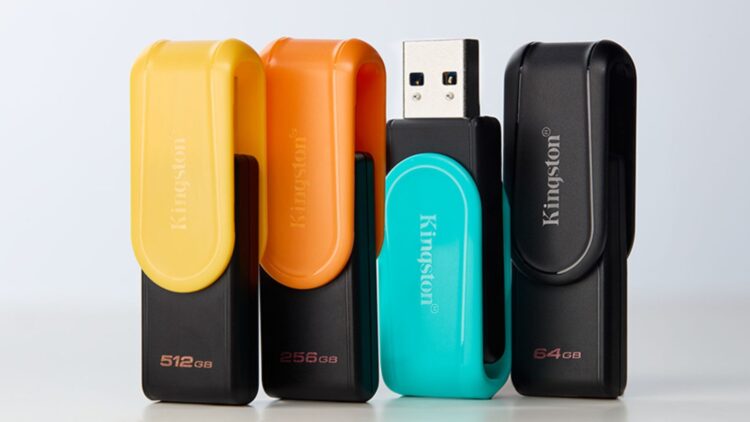
USB flash drives have long been recognized for their ability to store and transfer data, but their functions extend far beyond this basic utility. With the advent of enhanced models like USB 3.0, these devices have become indispensable tools in the tech landscape. Here are five valuable uses for your USB flash drive that you may not have considered.
Enhancing Computer Memory
One of the most practical applications of a USB drive is its ability to boost system performance. Although it cannot replace Random Access Memory (RAM), it can optimize the operation of older computers through the Windows ReadyBoost feature. By simply plugging in the USB drive, right-clicking on the unit, navigating to Properties, selecting ReadyBoost, and activating the “Use this device” option, users can significantly enhance their device’s responsiveness. The speed of your USB drive directly correlates with the performance you will experience.
Installing Operating Systems
The days of relying on CDs and DVDs for software installations are fading. USB drives now serve as efficient mediums for installing operating systems like Windows and Linux. Microsoft provides a “Windows Installation Tool” for this purpose, while tools like UNetbootin facilitate the creation of bootable Linux drives. Once set up, users merely need to restart the computer with the USB drive connected and adjust the BIOS settings to boot from it. This method is particularly advantageous for technicians or users who frequently format their machines.
Repairing Your Computer
In the event of a system failure, a USB drive can be a lifeline. Tools such as Hiren’s BootCD PE allow users to run a lightweight operating system directly from the drive. This setup grants access to various repair programs, antivirus software, and data recovery tools. To utilize this feature, users must download the necessary software from official websites, install it onto the USB drive, and restart the computer with the drive connected.
Expanding Mobile Device Storage
USB flash drives also provide a simple solution for expanding storage on mobile devices. For iPhone and iPad users operating on iOS 13 or later, connecting a USB-C drive or a model featuring a Lightning connector is straightforward. Similarly, Android devices equipped with USB-OTG compatibility enable users to connect external drives directly. This functionality allows for file transfers, space freeing, and backups without relying on cloud services, making it a practical choice for users on the go.
Utilizing as a Security Key
In an era where data security is paramount, USB drives can double as digital keys. Programs like USB Raptor and KeyLock enable users to lock their computers until the USB drive is connected. This method offers an uncomplicated way to protect sensitive data, especially in shared environments such as offices. For optimal convenience, a compact USB drive or one with a keychain attachment is recommended, ensuring it is both portable and difficult to misplace.
As technological advancements continue to enhance the capabilities of USB flash drives, users can leverage these devices for a multitude of functions beyond mere data storage. From boosting computer memory to securing sensitive information, the versatility of USB drives is undoubtedly a valuable asset in today’s digital landscape.

Urgent Study Reveals Shark Teeth Insights to Combat Extinction

Church Members Rally Together After Thanksgiving Day Fire

Trump Promises to Release MRI Results from October Scan

U.S. Investors Boost Canadian Oil Firms Despite Falling Prices

Nick Jonas Unveils Solo Album Title and Release Date at Las Vegas Brunch

Researchers Call for Low-Alcohol Drink Label Changes for Pregnant Women

Community Aims for Record in World’s Largest Christmas Cookie Exchange

Mayor Appoints Alan Wong to District 4 Supervisor Position

Mayor Names Alan Wong as New District 4 Supervisor Amid Controversy

University of Hawaiʻi at Mānoa Joins $25.6M AI Initiative for Disaster Monitoring

IROS 2025 to Showcase Cutting-Edge Robotics Innovations in China

ALMA Discovers Companion Orbiting Red Giant Star π 1 Gruis

Stone Island’s Logo Worn by Extremists Sparks Brand Dilemma

Startup Liberate Bio Secures $31 Million for Next-Gen Therapies

Bravo Company Veterans Honored with Bronze Medals After 56 Years

Mary Morgan Jackson Crowned Little Miss National Peanut Festival 2025

Judge Considers Dismissal of Chelsea Housing Case Citing AI Flaws

Top Hyaluronic Acid Serums for Radiant Skin in 2025
-
Science4 weeks ago
University of Hawaiʻi at Mānoa Joins $25.6M AI Initiative for Disaster Monitoring
-
 Science2 months ago
IROS 2025 to Showcase Cutting-Edge Robotics Innovations in China
-
 Science2 weeks ago
ALMA Discovers Companion Orbiting Red Giant Star π 1 Gruis
-
 Lifestyle2 months ago
Stone Island’s Logo Worn by Extremists Sparks Brand Dilemma
-
 Health2 months ago
Startup Liberate Bio Secures $31 Million for Next-Gen Therapies
-
 Lifestyle2 months ago
Mary Morgan Jackson Crowned Little Miss National Peanut Festival 2025
-
 World2 months ago
Bravo Company Veterans Honored with Bronze Medals After 56 Years
-
 Politics2 months ago
Judge Considers Dismissal of Chelsea Housing Case Citing AI Flaws
-
 Health2 months ago
Top Hyaluronic Acid Serums for Radiant Skin in 2025
-

 Sports2 months ago
Yamamoto’s Mastery Leads Dodgers to 5-1 Victory in NLCS Game 2
-

 Science2 months ago
Arizona State University Transforms Programming Education Approach
-

 Business2 months ago
Truist Financial Increases Stake in Global X Variable Rate ETF