
Top Stories
6 Essential GNOME Extensions to Transform Your Linux Experience NOW

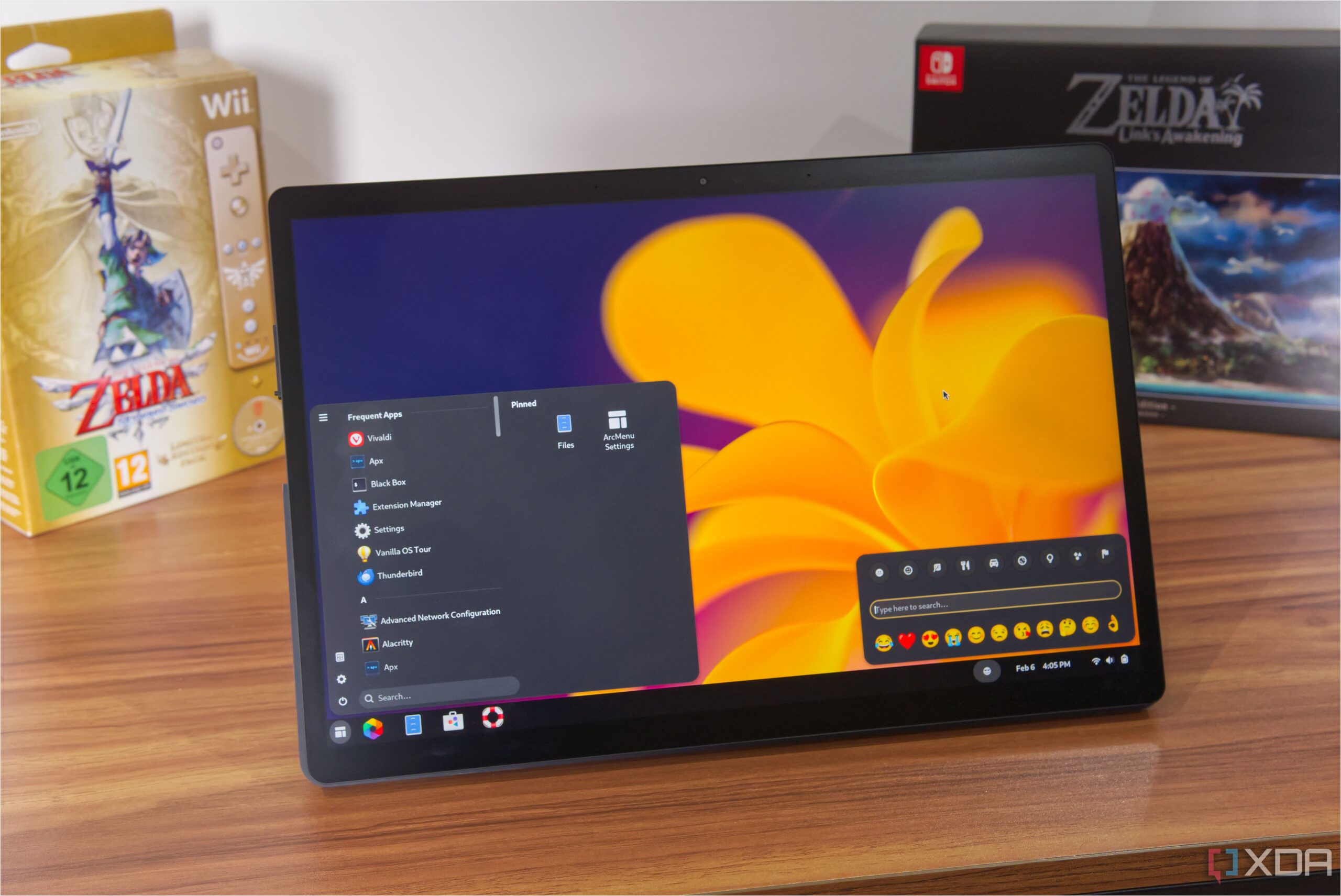
URGENT UPDATE: Linux users transitioning from Windows are discovering vital tools to enhance their experience on Ubuntu. New reports highlight six **GNOME extensions** that can dramatically replicate and improve upon features familiar to Windows 11 users.
The shift away from **Windows 11** can be challenging, with many users missing the intuitive interface and functionalities. However, with the introduction of enhancements like **Dash to Panel** and **ArcMenu**, the GNOME desktop environment can be transformed to feel more familiar and user-friendly. This is particularly crucial as many users are hesitant to make the switch to Linux due to the perceived learning curve.
Dash to Panel is at the forefront of these extensions, effectively bringing back the classic Windows taskbar experience. Instead of the unconventional side and top bars in Ubuntu, Dash to Panel positions apps at the bottom of the screen. It allows extensive customization, enabling users to adjust icon placements, sizes, and more—offering a personalized interface that surpasses Windows capabilities.
For those yearning for a traditional Start menu, the **ArcMenu** extension delivers just that. It replaces the full-screen app interface with a compact floating menu, reminiscent of Windows. Users can customize its appearance, adjusting dimensions and colors, making it a seamless fit for their preferences.
Visual enhancements are also part of the package. The **Blur my Shell** extension adds a modern touch by applying a blur effect to various GNOME shell elements. While more aesthetic than functional, it contributes to an appealing overall look that can make the switch to Linux feel less daunting.
Clipboard functionality, a feature often praised in Windows 11, receives a powerful upgrade with the **Clipboard History** extension. This tool offers a smoother and more efficient experience than its Windows counterpart, allowing users to access previously copied items effortlessly. It resides on the dock or taskbar, streamlining productivity significantly.
Similarly, **Emoji Copy** enhances communication by facilitating easy access to frequently used emojis. This extension responds more fluidly than Windows’ emoji menu, showcasing a broader selection and faster navigation through emoji options—making it a must-have for users accustomed to quick emoji usage.
Finally, the **Tiling Shell** extension revolutionizes window management, competing effectively with Windows’ own PowerToys utility, **FancyZones**. It allows users to create tailored layouts for their windows, ensuring a more organized workspace. With simple mouse movements and key combinations, snapping windows into place becomes intuitive and efficient.
As users explore the capabilities of these GNOME extensions, they find a welcoming environment that counters the intimidating first impression of GNOME. These tools not only help bridge the gap between Windows and Linux but also enhance productivity and personalization.
With these extensions now available, the transition to Linux is less about sacrifice and more about enhancing user experience. As more individuals adopt Ubuntu, the community is growing rapidly, fueled by the appeal of these innovative tools.
For anyone considering a move to Linux, these extensions are a game-changer. Explore the power of **GNOME extensions** today and reshape your Ubuntu experience to meet your needs!

Robinhood Stock Surges 2.5% Today Amid Tech Market Recovery

Philadelphia’s Earth Month Kicks Off with Free Events in Parks

GSK’s Inhaler Decision Sparks Health Concerns for Children

Bradford’s Fish Fry Fridays Offer Community Spirit and Flavor

Speculation Rises on Shutdowns During Trump’s Potential Presidency

Samsung Galaxy Watch 9 to Feature Larger Battery, Report Reveals

Inventors Find New Purpose Through Unconventional Paths

UConn Huskies Aim for Back-to-Back Titles in 2026 NCAA Tournament

U.S. Mine Countermeasure Ships Dock in Malaysia for Logistics Stop

University of Hawaiʻi at Mānoa Joins $25.6M AI Initiative for Disaster Monitoring

$2.2 Million Boost for Cancer Research and Training in Hawaiʻi

ALMA Discovers Companion Orbiting Red Giant Star π 1 Gruis

Sacituzumab Govitecan Shows Promise for HR+/HER2− Breast Cancer

币安人生 Sees $15.92 Million in Trading Volume Amid Market Fluctuations

New Gel Offers Hope for Regrowing Tooth Enamel in Dentistry

CAVA Group Shares Surge 5.1% Amid Mixed Analyst Ratings

Supreme Court to Review Birthright Citizenship for Children of Immigrants

Christian Bale in Talks to Join Leonardo DiCaprio in Heat 2
-
Science9 months ago
University of Hawaiʻi at Mānoa Joins $25.6M AI Initiative for Disaster Monitoring
-
 Health7 months ago
$2.2 Million Boost for Cancer Research and Training in Hawaiʻi
-
 Science8 months ago
ALMA Discovers Companion Orbiting Red Giant Star π 1 Gruis
-
 Health7 months ago
Sacituzumab Govitecan Shows Promise for HR+/HER2− Breast Cancer
-
Politics5 months ago
币安人生 Sees $15.92 Million in Trading Volume Amid Market Fluctuations
-
 Health8 months ago
New Gel Offers Hope for Regrowing Tooth Enamel in Dentistry
-
 Business7 months ago
CAVA Group Shares Surge 5.1% Amid Mixed Analyst Ratings
-
 Politics7 months ago
Supreme Court to Review Birthright Citizenship for Children of Immigrants
-
 Entertainment8 months ago
Christian Bale in Talks to Join Leonardo DiCaprio in Heat 2
-

 Lifestyle8 months ago
Art Deco and Traditional Designs Set to Transform Homes in 2026
-

 Lifestyle7 months ago
Fernando Mendoza Secures Maxwell and O’Brien Awards Ahead of Heisman
-

 World8 months ago
Swiss Residents Reject 50% Inheritance Tax on Wealthy